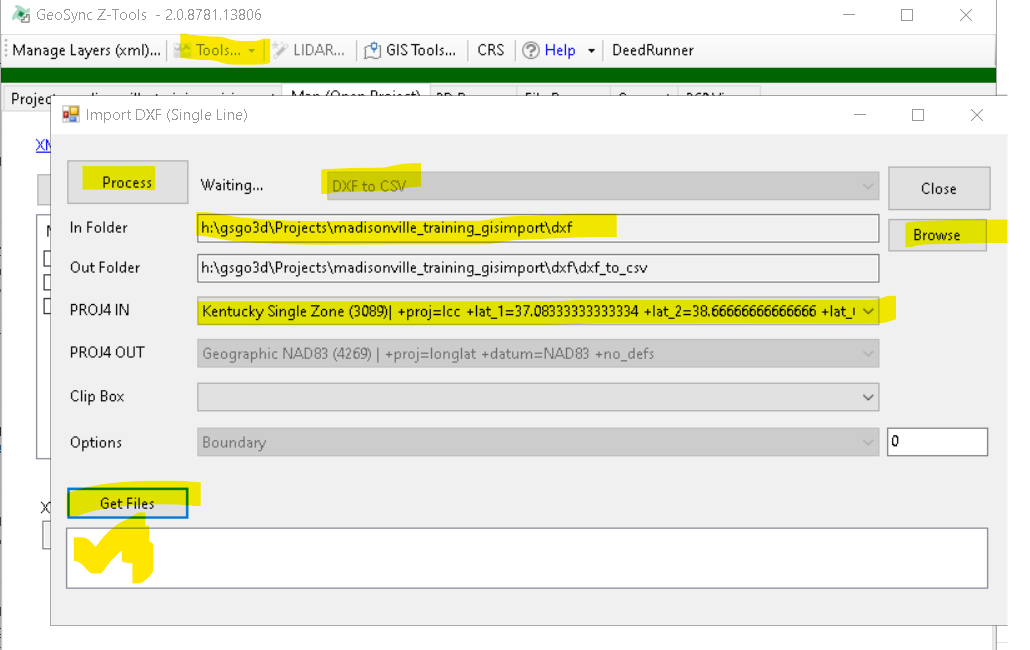
Import DXF or SHP Map Boundary
You can import a boundary file to be used for finding and clipping elevation data. Here are the steps:
- Export a DXF polyline file with only 1 feature (boundary)
- Copy DXF to your Z-Tools project – put in DXF folder
- Open the Tools…-Manage Layers (XML) tool
- Import DXF Button
- Fill out info on import tool
- Browse to DXF folder
- Set the DXF projection
- Get Files and check the DXF file
- Process (this should create a boundary XML file)
- Close Manager Layers
- From the Map – use the Layer button to pick the new boundary